blog
Interactive Prototyping – Why does it matter?
By Siddhant Chaudhary Design December 2, 2019

After one has an idea for the mobile app development or website for their business, the next step comes is to create a wireframe on paper or a tool which can provide the users with a proper experience while browsing them. Whether it’s your pizza business or gaming studio, interactive prototyping can help you to understand what user wants and at what place.
In present’s extremely competitive market, UX or user experience designing has become important. Businesses that spend in user experience design do better than their competitors. This UX design is an activity that creates a basis for prototyping which for digital products context, is a limitation on how the user will be interacting with the interface.
What is Interactive prototyping?
A prototype is an outline draft that is created to assess layout ideas, actions and flow in a system. Prototypes are an essential means for the resolution of several possible issues in a user experience design idea before putting so many resources to make work upon it. They can show an idea with more clarity and a higher level of user interaction compared to an exhaustive document.
An Interactive Prototype provides an insight into the user interaction at various levels for a website or mobile app. They allow users’ to check the usability and feasibility of the designs before the development team start working on the coding part and thus remove any unexpected discoveries during the project. This is a mockup or demo of a digital product which will show how it will look after going Live, how would be the navigation and how the users can use the dropdown or filter functionality. They are as robust that a user can check features and functionality, usability, and get the real feel of the system all in one.
Types of Interactive Prototype
Interactive prototypes can vary in fidelity depending on project goals. Low-fidelity prototypes focus on user flows and structure, while high-fidelity prototypes closely resemble the final product with realistic interactions, animations, and visual design. Teams often progress from wireframes to interactive design prototyping before development begins.
Browse our services
We are a team of creative problem solvers who use design and development to transform businesses.
See what we offer

What Are the Limitations of Traditional Prototyping and Why Is Interactive Prototyping Better?
Traditional methods such as paper sketches, static wireframes, and visual mockups are useful for early ideation but often fail to demonstrate real user interactions. They provide limited insight into navigation, workflows, and usability.
Interactive prototyping bridges this gap by allowing stakeholders to experience actual user journeys, test functionality, and provide actionable feedback before development. This significantly reduces costly revisions later in the project lifecycle.
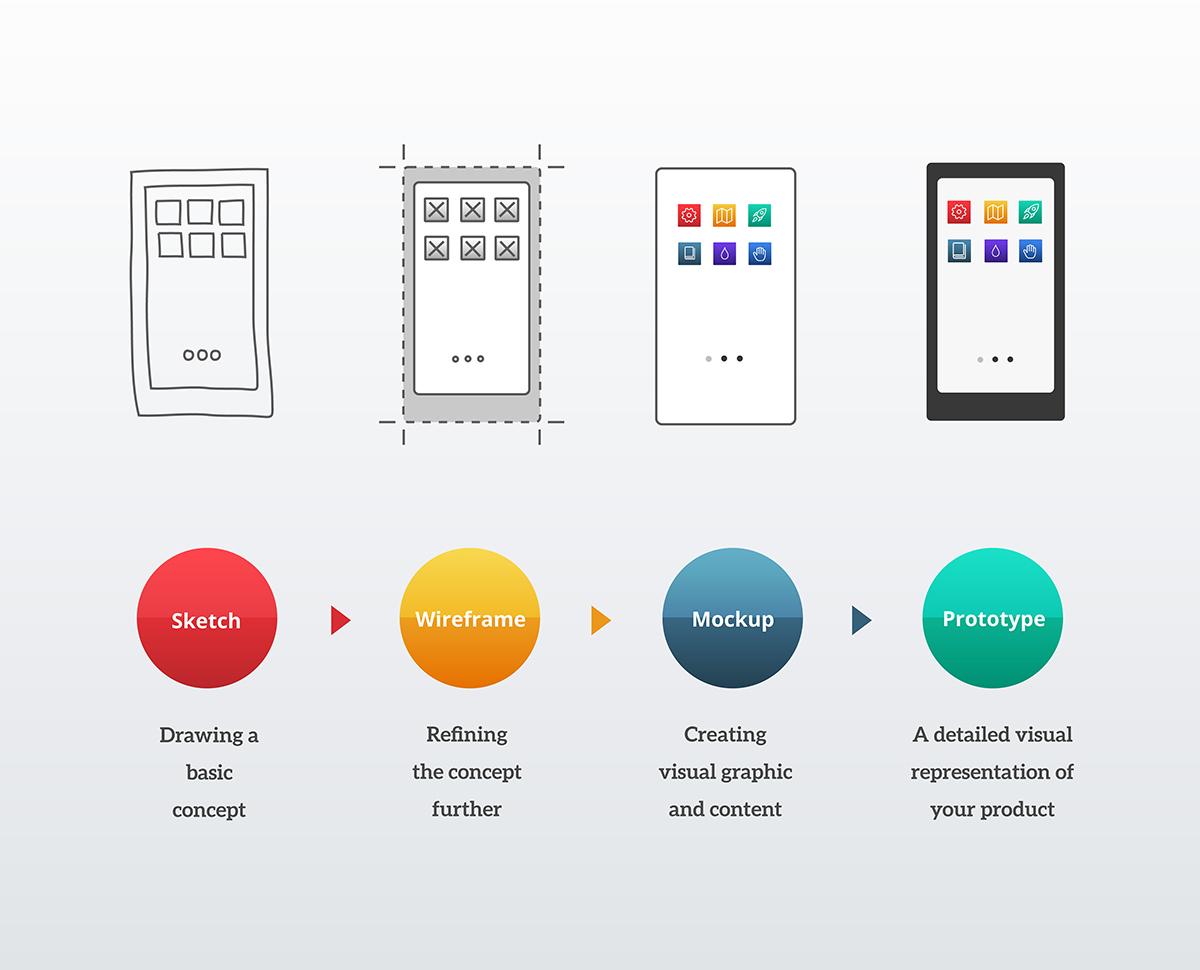
Creating sketches on paper, low fidelity wireframes, or simply mockups can sometimes miss some of the crucial features or functionalities within the website/app thus providing less accuracy. On the other hand, the closer the mock-up appears to the anticipated end design, the more precise is the prototyping output.
Similarly, a wireframe provides a rough idea of how each screen will look, the elements presented on each screen, what could be the input from the users and how it will be processed and how the elements will work when the end-users interact with them. It is a low-fidelity illustration and is not interactive and does not show how the product can work in real-time. Mockup, on the other hand, is similar to wireframes but also brings in colours, typography, style, and an extent on how the actual website or app is going to work. It could have Buttons, text bars, content layout and navigation graphics.
A prototype is a high-fidelity illustration of the final digital product which works like the actual website/app with or without any coding. It contains hyperlinks, navigations, clickable buttons and other components which show on how it would in the actual app.
Paper prototyping works fine in the early phases of designing, in which simple screens are drawn on paper and organized to imitate a digital user interaction. Though they are fast and inexpensive, they can create a loophole while designing the actual product due to some undiscovered items. There is always a limit to the data collected in terms of usability in traditional prototyping methods. Also, in traditional prototypes development, customer involvement is not the same as that of interactive prototyping, which can lead to future issues. The lack of precision in traditional prototyping methods allows customers to focus on what is being visually represented instead of how close it is to the real product.
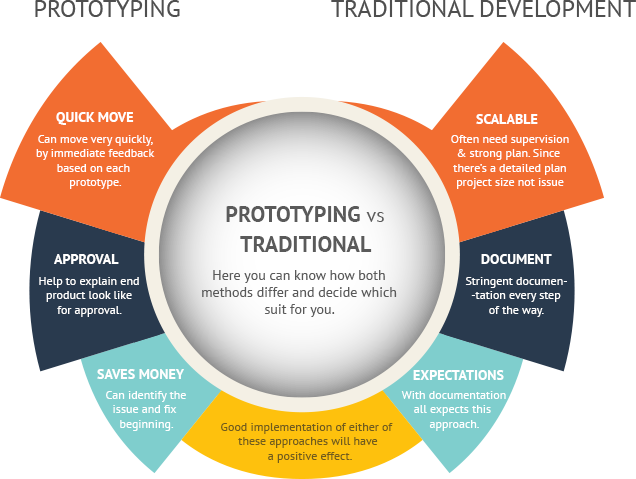
On the other hand, Interactive prototyping provides similar user experience to the customers as of what they can expect in their actual product thus allowing them to scope for exhaustive UX testing. As prototypes facilitate the users to determine how the product could be used daily when launched, they are important in refining the usability of the product and if it is viable
How Interactive Prototyping Works in the Product Development Process
Interactive prototyping typically begins after information architecture and user flows have been defined. Designers create clickable screens, simulate user interactions, and test critical workflows. Feedback gathered from users and stakeholders is then incorporated into iterative design improvements.
This approach aligns closely with the Digital Product Design Process and helps teams validate assumptions before investing in development resources.
Advantages of Interactive Prototyping
Creating an interactive prototype that shows features and functionality of an app in development can certainly make an impact on the final design as well as on the whole project. Here are some major advantages showing how interactive prototypes can help your design idea.
- Creating a clickable prototype allows customers to gain a complete idea of how the product is going to work.
- It allows users and stakeholders to provide their timely valuable feedback using the entire application scenarios within the proper context than asking to make changes after complete project implementation.
- Sometimes it is found that design changes during the development phase can also affect the coding part and thus can outlay more time and efforts from the development team which could considerably impact the development plan. Additionally, recoding a website or application usability issues after production can be costly. Thus it is recommended to create prototypes at earlier project stages considering user’s feedback which is much simpler and helps reducing overall development time.
- These prototypes can be used to show functionality in a better way than just written screen specifications thus performing as a helpful reference tool for the development team.
- A prototype allows users and key stakeholders an opportunity to check on how the application design is going to be and how it would be used, including interactions and buttons as close to that of the final product and thus providing a common vision among stakeholders and users.
- Prototyping allows users to see where they may have problems with the design during the earlier project stages and can determine the necessary features thus saving costs. It is much efficient to utilize prototypes to fix issues as they arise than to continue until the development process goes on.
- A prototype allows user testing at the beginning of a project rather than at the end making it fast, cheap, and easy as it integrates effortlessly into most design processes.
What is Rapid Prototyping?
As the name suggests, Rapid prototyping is faster and thus cheaper than traditional prototyping. It is the process of quickly learning the future state of the product, and validating it with stakeholders. In rapid prototyping, the revisions are quickly based on users’ feedback and contain the following three stages:
- Create prototype with information architecture, layout and user flows containing entire user experience with navigations between different screens
- Let the stakeholders review the prototype and collect their feedback that could help you understand their actual requirements. This would list the required changes and will form scope for the next iteration.
- Next comes is again Iterate, Test, & Repeat cycle, in which a new prototype is created, shown to clients, getting feedback and working upon it.
How Interactive Prototyping Improves User Experience (UX)
Effective prototypes enable teams to observe how users interact with interfaces in realistic scenarios. By identifying friction points early, designers can refine navigation, improve accessibility, and optimize user journeys. This results in better usability, higher engagement, and a stronger overall user experience.
Business Benefits of Interactive Design Prototyping for Enterprises
For enterprises, interactive design prototyping helps reduce project risk and improve alignment across departments. Product managers, designers, developers, and executives can evaluate concepts using a shared visual reference. This minimizes misunderstandings, accelerates approvals, and improves project outcomes.
Popular Interactive Prototype Tools
Several tools are commonly used for creating interactive prototypes:
Figma
Adobe XD
Sketch
Axure RP
ProtoPie
InVision
These platforms support collaborative design workflows and enable rapid testing of user interactions.
Best Practices for Creating Effective Interactive Prototypes
To maximize value from interactive prototyping:
Focus on key user journeys.
Prioritize realistic interactions.
Test with actual users early.
Iterate based on feedback.
Keep prototypes aligned with business objectives.
Document insights from usability testing.
Organizations looking to How to Speed Up App Development often use prototyping as a way to identify issues before development begins.
Emerging Trends in Interactive Prototyping
The future of prototyping is being shaped by AI-powered design tools, collaborative cloud-based workflows, voice interaction testing, and immersive AR/VR experiences. These technologies enable teams to create increasingly realistic prototypes while shortening design cycles and improving stakeholder engagement.
Conclusion
For most of the companies, prototyping gives the best outcome owing to early feedback and the ability to find troubles at the earlier stages of the project thus providing better project implementation. However, it depends on the objectives and limitations of the project, along with the timeline, budget, and stakeholders views.
FAQs
How does interactive prototyping support collaboration across teams?
Interactive design prototyping creates a shared understanding between designers, developers, stakeholders, and business teams. Everyone can review the same experience, provide feedback, and align on product goals before development starts.
How many users do you need to test an interactive prototype?
For most projects, testing an interactive prototype with five to ten representative users is often enough to uncover major usability issues and identify improvement opportunities.
How is an interactive prototype different from a static wireframe or mockup?
If you're wondering what is interactive prototype functionality, the key difference is interaction. Wireframes and mockups are static visual representations, while interactive prototypes simulate navigation, user actions, and system responses.
How does interactive prototyping fit into agile or iterative workflows?
Interactive design prototyping supports agile development by enabling rapid testing, feedback collection, and iteration before development sprints begin, reducing rework and improving efficiency.
How does interactive prototyping help validate user flows before development?
Using interactive prototype examples, teams can simulate real-world user journeys, identify bottlenecks, test navigation paths, and confirm that workflows meet user expectations before coding starts.
You May Also Like